Privacy & Security: Your data stays private and secure. All PDF processing happens locally in your browser, guaranteeing that nothing is ever uploaded or stored on any server. You remain in full control of your documents at all times.
Why Choose SwiftPDFLab?
No Sign-Ups Required
Start using our PDF tools immediately - no account or email needed.
No File Uploads
All processing is done completely on your device, so your files never leave your computer.
Free Forever
Every feature is free to use ? no trials, no subscriptions, and no paywalls.
No Limits
Truly unlimited usage. We impose no file size caps or usage restrictions, hidden or otherwise.
Batch Processing
Handle multiple PDFs at once. Merge, split, or convert entire batches in one go without hassle.
Blazing Fast
Instant results. With no server uploads or downloads, there's no waiting around.
Built-in PDF Editor — 45+ Tools
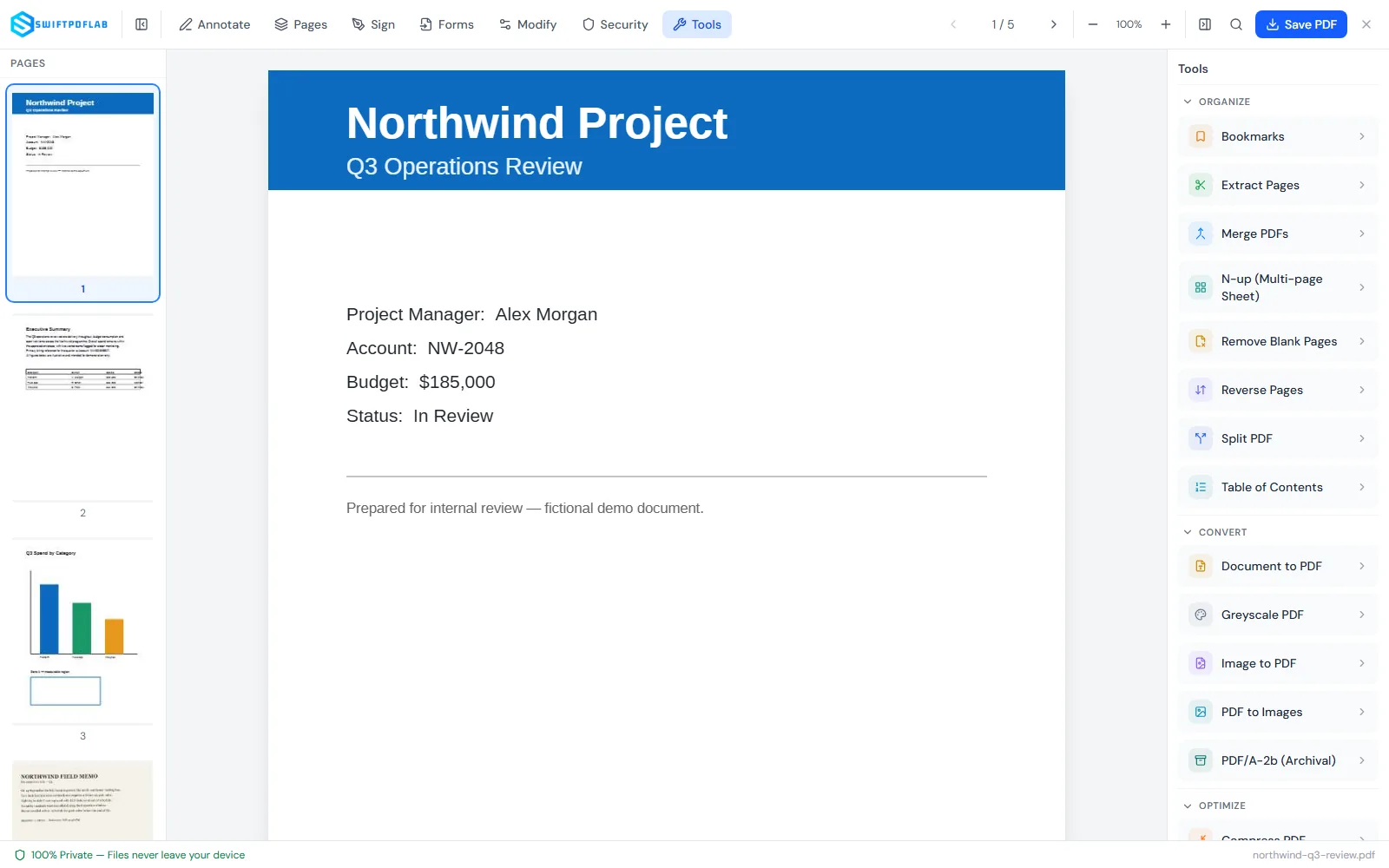
Annotate, sign, fill forms, merge, split, compress, redact — 45+ tools in total, all directly in your browser with our full-featured editor.
Full-Featured PDF Editor
Annotate, sign, fill forms, merge, split, compress, redact — 45+ tools in total, right in your browser. No uploads, no accounts, no sign-ups.
45+ professional tools · 100% private · Works offline
Undo/Redo · Keyboard shortcuts · Touch & mobile editing · Multi-page support · Export to PDF
Get Started with Tools
Click a tool to open the file uploader
Processing...
Alert
This is an alert message.
Document Preview
Settings
Press and hold keys to set a shortcut. Changes are auto-saved. Warning: Avoid common browser shortcuts (Cmd/Ctrl+W, Cmd/Ctrl+T, Cmd/Ctrl+N
etc.) as they may not work reliably.
Display Preferences
Use the full screen width for all tools instead of a centered container
Warning
We keep
your information safe
by following global security standards.
All the processing happens locally on your device.
GDPR compliance
Protects the personal data and privacy of individuals within the
European Union.
CCPA compliance
Gives California residents rights over how their personal
information is collected, used, and shared.
HIPAA compliance
Sets safeguards for handling sensitive health information in the
United States healthcare system.
Frequently Asked Questions
Yes, absolutely. All tools on SwiftPDFLab are 100% free to use, with
no file limits, no sign-ups, and no watermarks. We believe
everyone deserves access to simple, powerful PDF tools without a
paywall.
Your files are as secure as possible because they **never leave
your computer**. All processing happens directly in your web
browser (client-side). We never upload your files to a server, so
you maintain complete privacy and control over your documents.
Yes! Since SwiftPDFLab runs entirely in your browser, it works on any
operating system with a modern web browser, including Windows,
macOS, Linux, iOS, and Android.
Yes. SwiftPDFLab is fully GDPR compliant. Since all file processing
happens locally in your browser and we never collect or transmit
your files to any server, we have no access to your data. This
ensures you are always in control of your documents.
No. We never store, track, or log your files. Everything you do on
SwiftPDFLab happens in your browser memory and disappears once you
close the page. There are no uploads, no history logs, and no
servers involved.
Most PDF tools upload your files to a server for processing.
SwiftPDFLab never does that. We use secure, modern web technology to
process your files directly in your browser. This means faster
performance, stronger privacy, and complete peace of mind.
By running entirely inside your browser, SwiftPDFLab ensures that
your files never leave your device. This eliminates the risks of
server hacks, data breaches, or unauthorized access. Your files
remain yours?always.
We care about your privacy. PDF files and document contents are
processed locally in your browser and are not uploaded to our
servers. We use website analytics (Google Analytics and Cloudflare
Web Analytics) to understand aggregate site usage and performance.
Your documents are not intentionally sent to these analytics
services by the PDF editing workflow.
Yes, for supported PDF text. SwiftPDFLab can replace supported
existing text and, where compatible resources permit, adjust size
and apply Bold or Italic. Unsupported edits are refused safely.
Why people use SwiftPDFLab
Built around the things that matter most in everyday PDF work: speed, privacy, simplicity and capable editing.
Fast, no-upload workflow
Merge, split, convert and compress PDFs directly in the browser without waiting for files to travel to a server.
No sign-up friction
Open the tool, finish the job and download the result. No account creation or subscription flow in the way.
Useful for everyday PDF jobs
From image conversion and page extraction to compression and document cleanup, the toolbox covers the small jobs people deal with every day.
Privacy-first by design
PDF processing happens locally in the browser, so the document itself does not need to be uploaded for routine processing.
A serious browser PDF editor
Annotate, sign, create forms, organize pages, redact content and handle advanced editing workflows from one interface.
Secure redaction
Redaction is designed to remove the underlying page content in the exported result rather than simply covering it visually.
PDF/A-2b archival workflow
Export eligible edited documents to PDF/A-2b with embedded editor fonts, metadata checks and internal structural validation.